Coloring and Drawing For Girls
- 4.6
- Rating
- 10.00M
- Installs
- Free
- Price

 Analysis by App-foxy
I found Coloring and Drawing For Girls to be a gentle, low-pressure way to spend a few minutes on a phone or tablet. It is an educational game from Toy Tap LLP, but its learning value comes through creative practice rather than lessons, quizzes, or formal instruction. The basic idea is simple: choose a picture, add color, and decorate it with your own choices. That simplicity is exactly what makes it approachable, although it also means the experience will not satisfy people looking for a deep drawing studio or a structured art course.
After using it, my strongest impression is that the game is aimed at children who enjoy visual play and adults who want something uncomplicated to share with them. The tone is cheerful, the activities are easy to understand, and there is little pressure to “win.” I would recommend trying it with a child who becomes frustrated by complicated menus, while remembering that a touch screen still creates practical challenges for some users. The best part is the freedom to experiment without worrying about making a permanent mistake.
How the experience works for different players
I find that different players benefit from the game in different ways: some enjoy choosing colors independently, while others get more from a little guidance or a shared theme. I’d pay attention to whether the screen feels comfortable and the choices feel inviting, then adjust the setup rather than expecting every child to use it the same way. That makes it easier to decide what kind of support—or alternative—fits best.
You May Also Like

 Blood Strike: 2.5 Anniversary
Blood Strike’s Loadouts Turn Every Drop Into a Tactical Gamble
A close look at Blood Strike’s custom loadouts: how fast access to signature weapons reshapes its battle royale rhythm, rewards preparation, and narrows the gap between fights.

 Pandora - Music & Podcasts
Pandora’s Music Is Easy to Start, but Harder to Recover
Pandora’s strength is its low-effort path from a seed to a station. Its weak spot is how much confidence it asks you to place in connection, setup, and quiet recovery.

 8 Ball Pool
 Is Built on Rivalries, Rematches, and Routine
A close look at the rivalries, rematches, shared routines, and unanswered safety questions that turn a quick pool match into a persistent mobile community.

 Samsung Music
’s Quiet Strength Is Playing What You Already Own
Its reach comes less from spectacle than from dependable access to a personal library. That simplicity is both the app’s strongest retention engine and its ceiling.

 AccuWeather: Weather Radar
AccuWeather Review: A Quick, Clear Forecast for Everyday Decisions
For everyday plans, the best forecast is the one you can understand quickly. AccuWeather makes rain timing, radar, and local conditions easy to act on, with a few trade-offs.

 Hill Climb Racing
Why Hill Climb Racing Still Turns Crashes Into One More Run
A tiny car, a bumpy hill and one more upgrade: Hill Climb Racing keeps resurfacing because its simple chaos makes every near-miss feel personal.
More From Our News Desk



Readable screens and an easy starting point
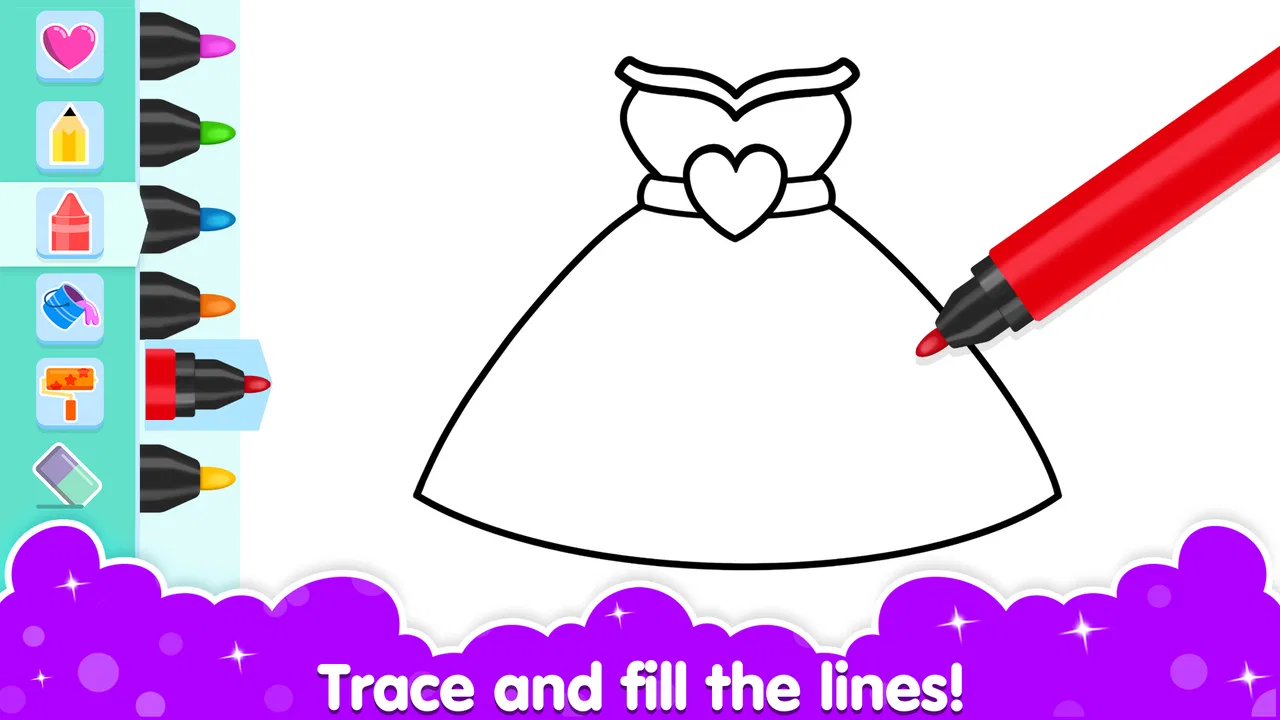
The most important design decision here is the directness of the activity. A young player does not need to understand a complicated game loop before beginning. Coloring is familiar, and the visual nature of the activity reduces the amount of reading needed to get involved. That can be useful for children who are still building confidence with written instructions, or for anyone who prefers learning through pictures and actions.
In everyday use, I would hand the device to a child and begin by showing the basic sequence: select an image, choose a color, touch the area to fill, and continue decorating. That short demonstration is usually more helpful than explaining every control at once. The game’s appeal depends on letting the player discover the result quickly, so long introductions would work against it.
Navigation feels most suitable for short, supervised sessions. A child who already understands tapping and swiping can usually explore without much help, while a younger child may still need an adult nearby to return to the picture selection screen or avoid tapping something unintentionally. The experience is visually inviting, but visual friendliness is not the same as perfect clarity for every player. Icons and decorative elements can still require interpretation.
I also appreciate that the activity does not demand a particular artistic ability. A child can fill a picture with conventional colors, create unusual combinations, or simply tap around to see what happens. That makes it more welcoming than drawing tools that expect careful lines. For a child who says “I can’t draw,” the coloring format offers a less intimidating entry point because the picture already provides a starting structure.
There is an educational benefit in that structure. Choosing between colors, noticing boundaries, and deciding what should stand out can support early visual decision-making. I would not treat it as a replacement for handwriting practice or an art lesson, but it can complement those activities by encouraging attention and personal choice.
Why the simple format helps some abilities
Coloring games can be easier than fast action games because there is no visible countdown or opponent demanding immediate reactions. A player can pause and think about the next color. That slower rhythm is valuable for children who need more time to process choices, and it is also comfortable for adults who want a calm activity rather than another competitive challenge.
The game’s free entry point makes it easy to test this fit. It costs nothing to start, while optional purchases range from $1.99 to $29.99 per item. I would let a child explore the free experience before considering any purchase, especially if the goal is simply to see whether the controls and visual style work well for them. A free download should not be confused with an entirely purchase-free experience.
For families, the useful workflow is to establish expectations before handing over the device. I would explain which parts the child may use independently and whether purchases are allowed. This is not a criticism unique to this title; it is a sensible habit for any children’s app with optional paid content. It also prevents a creative activity from suddenly becoming a discussion about an unexpected purchase.
The age rating is Everyone, which matches the gentle character of the activity. Still, an age label does not tell me whether every child will find the interface comfortable. A child with limited touch accuracy may need a larger tablet, a steady surface, or help selecting small areas. Someone with visual sensitivity may prefer a dimmer screen and shorter sessions, depending on how the colors and decorations appear on their device.
Touch control, motor effort, and sensory comfort
The central physical demand is accurate touch. Even when the intended action is simply filling an area, the player must place a finger or stylus where the game expects it. For children developing fine motor control, this can be useful practice, but it can also become tiring if the image contains many small details. I would start with larger, simpler pictures and watch for signs of frustration rather than assuming that persistence is always beneficial.
A stylus may help a player who finds fingertip control imprecise, although the usefulness of one depends on the device and the individual. A tablet can also be easier than a small phone because the player has more room to see the picture and position a finger. On the other hand, a large screen may be heavier to hold, so placing it flat on a table can make the session more comfortable.
One practical tip is to separate the creative decision from the physical action. I might ask a child to choose all the colors first, then fill one section at a time. This reduces the number of decisions being made simultaneously and can make the activity feel more manageable. It also turns the game into a small planning exercise rather than a stream of random taps.
For players with reduced color perception, the game may be less about matching realistic colors and more about contrast, pattern, and personal expression. I would avoid presenting a “correct” color choice. Instead, an adult can describe colors by brightness or contrast and encourage the child to choose combinations that are easy for them to distinguish. That approach keeps the activity creative without making assumptions about how every player sees the screen.
Some children enjoy bright, busy visuals, while others become overwhelmed by them. I would use the device’s normal brightness controls and take breaks if the screen feels tiring. The game is naturally suited to short bursts, so there is no need to stretch one session into a long sitting. A few minutes of focused coloring can be more successful than expecting a child to complete a detailed picture in one go.
Audio is not central to the basic creative task, which is helpful in settings where sound is distracting or unavailable. I would still check the device before a child begins, because surrounding device sounds or other on-screen activity can affect the overall experience. The important point is that the coloring action itself can remain understandable through the visual interface.
Using it at home, while traveling, or together
I can see this game working particularly well during a quiet transition: after homework, before bedtime, or while waiting for an appointment. It gives a child something purposeful to do without requiring a long story or a competitive match. A parent can sit beside the player and talk about color choices, shapes, and decoration, turning a solitary screen activity into a small conversation.
It is also a reasonable travel companion when a child needs a calm distraction. I would test it at home first rather than introducing it for the first time in a car or waiting room. That lets the child learn the controls without the added pressure of a noisy environment or limited adult attention. If the screen is small, the player may need more assistance, particularly when the picture contains fine areas.
For shared play, I prefer giving each person a turn or agreeing on a theme, such as warm colors, ocean colors, or deliberately unusual combinations. This avoids one child taking over the device and adds a little structure without turning the experience into a contest. It can also support communication for children who find open-ended conversation difficult: discussing a picture gives them a concrete subject to point to and describe.
The game may be less suitable in a classroom if the goal is a carefully planned art activity with teacher-controlled materials. A teacher would have less control over the exact creative process than with paper, crayons, or a dedicated classroom tool. However, it could fit a short free-choice period or a digital creativity station where the purpose is exploration rather than assessment.
What it does well compared with ordinary alternatives
Compared with paper coloring books, the digital format removes the need for crayons, pencil sharpeners, and cleanup. That is a meaningful advantage for travel and small living spaces. It also allows a child to try colors without using up a page or worrying about going outside a printed outline. For families already carrying a phone or tablet, the convenience is obvious.
Paper still wins when the goal is tactile feedback, hand strength, or a break from screens. A child who benefits from feeling the resistance of a crayon may gain more from physical coloring than from tapping a display. I would use this game as an additional option, not as a universal replacement. Switching between digital and paper activities can serve different needs during the day.
Compared with a full drawing application, this game is easier to approach but less demanding. A professional-style drawing app may offer layers, brushes, detailed control, and a blank canvas, but those features can overwhelm a young beginner. Here, the prepared pictures reduce the fear of facing an empty screen. The trade-off is that a child who wants to draw original characters from scratch may quickly outgrow the format.
Compared with educational games built around spelling, numbers, or puzzles, the learning is more informal. There is no need to frame every session as a test. That makes it a good choice for relaxation and creative confidence, but a poor choice if a parent wants measurable practice in a specific school subject. I would choose it for expressive play, not for targeted academic revision.
Where the experience may still create barriers
The biggest limitation is that “easy to start” does not mean “easy for everyone.” Precise tapping can exclude players with tremors, limited reach, or difficulty maintaining a steady touch. An adult can help by stabilizing the device, using a larger screen, or taking over the smallest areas, but that changes the level of independence. Families should judge success by enjoyment and participation rather than by whether the child completes every detail alone.
Open-ended choice can also be a barrier for children who become anxious when there is no obvious right answer. In that situation, I would offer two color options or give the child a simple theme. The game becomes more approachable when freedom is introduced gradually. This is one of the less obvious strengths of shared play: an adult can provide just enough structure without controlling the final picture.
Another consideration is the presence of optional purchases. The game is free to begin, but the listed purchase range means families should decide in advance how they want to handle paid items. I would not leave that conversation until a child is already excited about a particular decoration or content choice. Clear limits protect the relaxed mood that makes the activity appealing.
Device context matters too. A phone is convenient, but a smaller display can make detailed coloring harder and may encourage a cramped grip. A tablet offers a more spacious canvas but is less portable and can be tiring to hold. I would choose the device based on the player’s control and comfort, not simply on whichever screen is available.
The current version is 3.3.5, and the game runs on Android devices using version 7.0 or later. That makes it usable on a range of older Android hardware, though the actual comfort of the experience will still depend on screen size, touch responsiveness, and general device condition. Before planning a group activity, I would open it on the intended device and check that the controls feel manageable for the child using it.
Who should try it, and who should choose something else
I think Coloring and Drawing For Girls is a good match for a child who likes pictures, enjoys choosing colors, and benefits from a calm activity with a clear visual starting point. It is also useful for parents looking for a low-effort creative option during short breaks. The game’s popularity is reflected in its average rating of 4.7 from around 9,500 ratings, and it has passed 10 million installs, so it is clearly reaching a broad audience.
I would skip it if the main requirement is advanced drawing control, a structured curriculum, or a fully tactile experience. A dedicated art app is better for original illustration, paper is better for hands-on craft, and a subject-focused educational game is better for deliberate academic practice. Choosing one of those alternatives is not a failure of this game; it simply reflects a different purpose.
The developer, Toy Tap LLP, has positioned the experience around accessible creative play rather than a demanding challenge. In my view, that is most successful when the player is allowed to work at their own pace. Adults should resist correcting every color choice or turning the finished image into a performance. The game has more value when it gives the child ownership of the result.
My inclusive verdict after using it
Coloring and Drawing For Girls is a friendly educational game whose strongest quality is its low barrier to creative experimentation. It does not require artistic confidence, fast reactions, or a complicated explanation before the first activity begins. For many children, that makes it an inviting first step into digital art and a pleasant way to practice visual choices.
Its inclusive potential depends heavily on the surrounding setup. A larger screen, a stable surface, sensible brightness, short sessions, and patient guidance can make a major difference. Players with precise-touch difficulties may still need assistance, and children who dislike bright or busy visuals may prefer paper or a quieter drawing tool. Those are important practical limits, not reasons to dismiss the game entirely.
My recommendation is to treat it as a flexible creative break rather than a complete learning program. Try a short session, begin with simple images, and notice whether the child feels curious or pressured. If the activity encourages them to make choices and talk about what they created, it is doing something worthwhile. For families seeking gentle, screen-based coloring with room for personal expression, this is a sensible free starting point—provided its touch demands and optional purchases fit your situation.
FAQs for Coloring and Drawing For Girls
01What age group is Coloring and Drawing For Girls suitable for?
Coloring and Drawing For Girls is designed for children aged 4 to 12, offering a fun and creative platform for young artists. The app includes age-appropriate content and easy-to-use drawing tools that will keep kids engaged and entertained while fostering their artistic skills.
02Does the app require an internet connection to function?
No, Coloring and Drawing For Girls does not require an internet connection for most of its features. Users can enjoy offline access to coloring pages and drawing tools, making it a perfect app for travel or areas with limited connectivity.
03Are there in-app purchases or advertisements in the app?
Yes, Coloring and Drawing For Girls includes both in-app purchases and advertisements. The app offers additional coloring pages and features through in-app purchases. Advertisements are present to support the app financially, but there is an option to remove them through a one-time purchase.
04Can parents monitor or restrict their child's app usage?
Absolutely, the app offers a parental control feature that allows parents to monitor and control their child's usage. Parents can set time limits, manage in-app purchases, and access a secure parent dashboard to ensure a safe and controlled environment for their child.
05Is the app available in multiple languages?
Yes, Coloring and Drawing For Girls supports multiple languages, making it accessible to a global audience. Users can select their preferred language from the settings menu, ensuring that children and parents can navigate and enjoy the app in their native language.
Pros
- User-friendly interface for easy navigation.
- Wide variety of coloring pages available.
- Includes fun drawing tools and effects.
- Offline mode for coloring anytime
- anywhere.
- Regular updates with new designs.
Cons
- Contains in-app advertisements.
- Limited free content without subscription.
- Occasional performance lags on older devices.
- Requires internet for some features.
- Some designs may be too complex for kids.

Coloring and Drawing For Girls
Gallery